Import a Workout From a Photo or Screenshot
Your workout is already written down. Don’t type it again.
Workout plan, screenshot, notebook or whiteboard: import an image. Grunty identifies the training information and turns it into a structured workout.
Join the waitlistFrom image to workout
- 01
Import
A photo, screenshot or workout plan saved on your phone.
- 02
Grunty understands
Grunty identifies the exercises and training data present in the image.
- 03
Check the data
Review the recognized exercises, sets, loads and reps. An unclear image may require corrections.
No need to retype your workout plan
From handwritten notes to structured data
The source photo
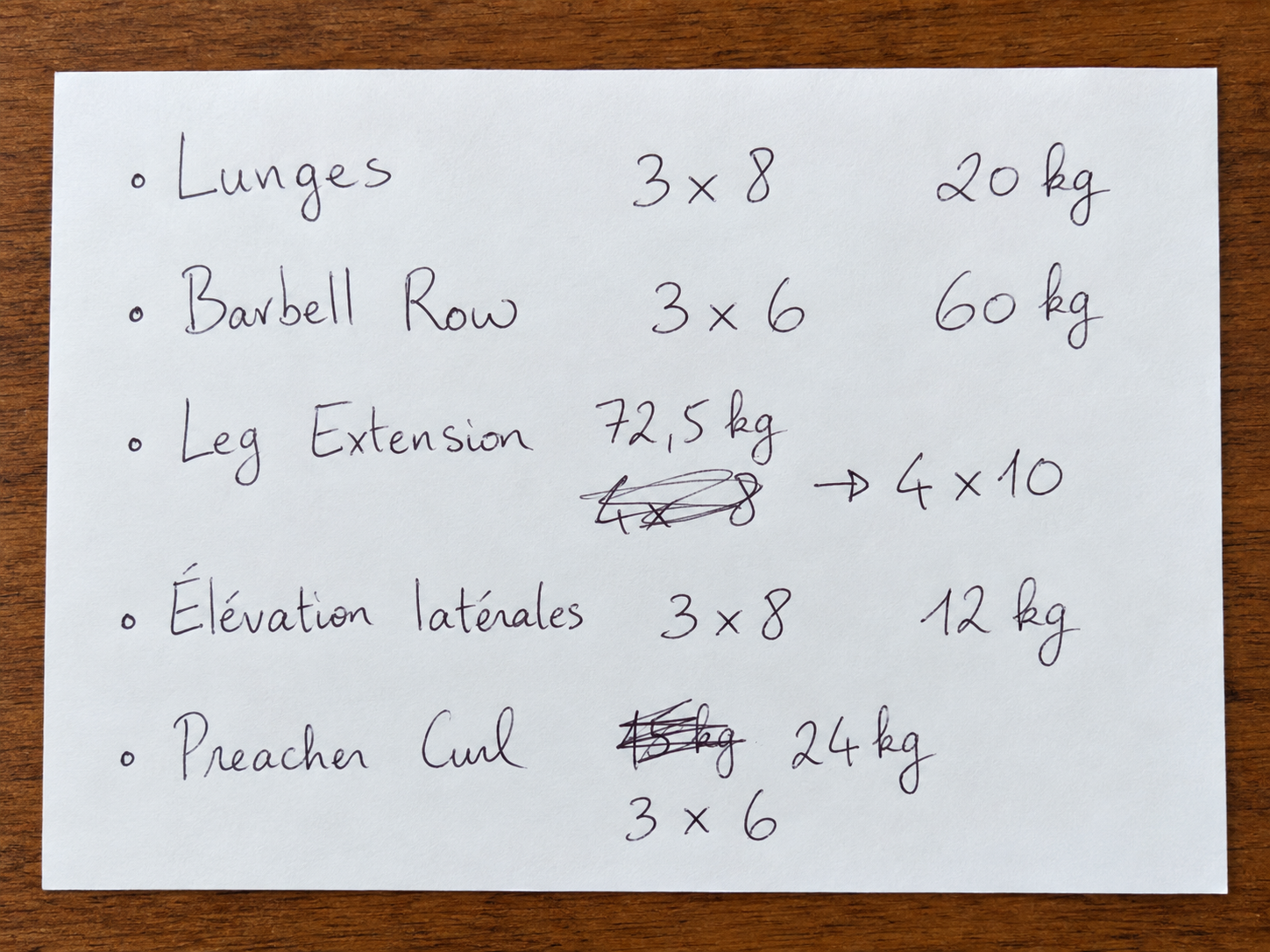
Structured workout
Lunges
3 × 8 — 20 kg
Barbell row
3 × 6 — 60 kg
Leg extension
4 × 10 — 72.5 kg
Lateral raises
3 × 8 — 12 kg
Preacher curl
3 × 6 — 24 kg
The transcription uses the corrected values: 4 × 10 for leg extension and 24 kg for preacher curl.
Prefer to speak?
While you train, dictate what you just did to log your sets without filling in every field.
Explore voice workout trackingOnce structured, your workout becomes useful
An image on its own stays an image. Structured data can feed your history, progress tracking and Grunty analysis. A plan describes intended work: check that it matches what you actually did before using it as a completed session.
Explore workout analysisFREQUENTLY ASKED QUESTIONS
What kinds of images can I import?
A photo or screenshot of a workout plan, notebook, whiteboard, gym machine display or connected device screen. More generally, any image containing readable training data: exercises, loads, reps, duration, distance and more. Image quality and legibility affect recognition.
Should I check the recognized information?
Yes. Review the exercises, loads, sets and reps. Recognition is not infallible, especially when an image is blurry or handwriting is hard to read.
Try Grunty at launch
Join the waitlist to be notified when it opens.